

Skip to the main content.

10 min read

Choosing the Right HDMI Cable for 8K AV: Understanding Cable Types and HDMI 2.1

Written by Updated July 30, 2026
Picture of Bob Gissubel
Bob Gissubel

Bob joined Turn-key Technologies in 2011, and helped launch TTI Cable, which is the structured cabling division of TTI. Additionally, he created TTI Fiber which is our overseas affiliate for fiber optic cable manufacturing. With over 20 years of experience in both domestic and international trade and sales, Bob has dedicated himself to providing each and every client with the best solution for their networking needs. It has been under Bob’s supervision that he has created an equally experienced ...

Choosing the Right HDMI Cable for 8K AV: Understanding Cable Types and HDMI 2.1

To choose the right HDMI cable for 8K AV, match the cable's certified bandwidth, length, and performance capabilities to your system's requirements, not simply the "8K" label on the packaging. That distinction is becoming increasingly important. In 2025, the HDMI Forum released HDMI Specification 2.2, doubling the maximum supported bandwidth from 48 Gbps to 96 Gbps to meet the growing demands of higher resolutions, refresh rates, and commercial AV applications.

For today's HDMI 2.1 deployments, Ultra High Speed HDMI® Cables remain the certified choice for systems requiring up to 48 Gbps, including support for 8K at 60Hz, 4K at 120Hz, Dynamic HDR, and Enhanced Audio Return Channel (eARC). As bandwidth requirements continue to increase, verifying a cable's certification and performance is more reliable than relying on resolution-focused marketing alone.

This guide explains how to evaluate HDMI cable types, bandwidth requirements, cable length limitations, and HDMI 2.1 capabilities when selecting a cable for professional 8K AV applications. You'll also learn when to use passive, active, or fiber HDMI cables, and how TTI Cable's Audio & Video Cables can support reliable AV deployments.

💡 TL;DR: What to Consider Before Choosing an HDMI Cable for 8K AV

  • Don't choose an HDMI cable based on the "8K" label alone. Verify its certified bandwidth, supported HDMI features, cable construction, and intended installation environment.

  • Match the cable to your application's bandwidth requirements. Ultra High Speed HDMI® Cables are certified for up to 48 Gbps, supporting HDMI 2.1 features such as 8K at 60Hz, 4K at 120Hz, Dynamic HDR, and Enhanced Audio Return Channel (eARC). Systems built around the new HDMI 2.2 specification will require hardware and cabling designed for even higher bandwidths as those products become available.

  • Cable length directly affects performance. Passive HDMI cables are generally best suited for shorter runs, while longer installations may require active or fiber-optic HDMI cables to maintain signal integrity.

  • Certification matters as much as specifications. Choosing certified HDMI cables helps reduce compatibility issues, handshake failures, and intermittent audio or video performance, particularly in professional AV environments.

  • Plan for the complete AV system, not just the cable. Displays, AV receivers, switches, extenders, and source devices must all support the required HDMI features to achieve the desired resolution, refresh rate, and audio performance.

  • Select cables based on deployment requirements. Consider bandwidth, cable length, installation environment, future scalability, and compatibility before making a purchasing decision.


Why Not Every HDMI Cable Is Suitable for 8K AV

One of the most common misconceptions about HDMI is that any cable labeled "8K" will deliver the same performance. In reality, HDMI cables differ in their certified bandwidth, supported features, construction, and intended applications. Selecting the wrong cable can limit resolution and refresh rate, introduce signal integrity issues, or prevent HDMI features from working as expected.

As video resolutions, refresh rates, and audio formats continue to evolve, so do the demands placed on HDMI infrastructure. A cable that performs reliably in a conference room displaying 4K presentations may not be suitable for an 8K digital signage deployment, a broadcast environment, or a gaming system running 4K at 120Hz with Dynamic HDR and eARC.

Rather than choosing an HDMI cable based solely on its advertised resolution, evaluate it against the technical requirements of the entire AV system.

What to Evaluate Before Selecting an HDMI Cable

Consideration Why It Matters What to Verify
Bandwidth Determines whether the cable can support the required resolution, refresh rate, HDR, and HDMI features. Certified bandwidth and supported HDMI features.
Cable Type Different HDMI cable categories are designed for different performance levels. Standard, High Speed, Premium High Speed, or Ultra High Speed certification.
Cable Length Longer runs are more susceptible to signal degradation. Whether a passive, active, or fiber HDMI cable is appropriate.
System Compatibility Performance depends on every device in the signal path. Displays, AV receivers, switches, extenders, and source devices support the required HDMI features.
Installation Environment Routing conditions can influence long-term reliability. Cable pathway, bend radius, and environmental conditions.

Understanding these considerations makes it easier to compare HDMI cable types, interpret HDMI specifications, and select a solution that meets your application's performance requirements.

Understanding HDMI Versions vs. HDMI Cable Types

One of the most common sources of confusion when choosing an HDMI cable is the difference between HDMI versions and HDMI cable types. Although people often refer to "HDMI 2.1 cables," HDMI specifications apply to devices, while HDMI cables are certified according to the level of performance they support.

For example, a display, AV receiver, or gaming console may support HDMI 2.1, but achieving HDMI 2.1 features also requires a cable with sufficient certified bandwidth. Selecting the right cable therefore depends on both the capabilities of the connected devices and the performance level of the cable itself.

HDMI Cable Types Explained

HDMI Licensing Administrator defines four primary HDMI cable categories, each designed to support different bandwidth and feature requirements.

HDMI Cable Type Typical Applications Supports
Standard HDMI Cable Legacy AV equipment and lower-resolution displays Basic HDMI applications
High-Speed HDMI Cable Full HD displays, many 4K AV systems 1080p, many 4K applications, Deep Color
Premium High-Speed HDMI Cable Commercial AV, HDR-capable displays, professional media systems Certified support for many 4K HDR applications
Ultra High-Speed HDMI Cable 8K AV, advanced gaming, commercial AV, digital signage Up to 48 Gbps bandwidth and HDMI 2.1 features, including 8K at 60Hz, 4K at 120Hz, Dynamic HDR, and eARC

The appropriate cable type depends on the application's bandwidth requirements rather than the display's advertised resolution alone.

Why Bandwidth Matters

As resolution, refresh rate, color depth, and audio capabilities increase, so does the amount of data transmitted between devices. An installation displaying 4K at 60Hz has different bandwidth requirements than one supporting 4K at 120Hz or 8K at 60Hz with Dynamic HDR and eARC.

This is why selecting a cable based solely on labels such as "8K" or "HDMI 2.1" can be misleading. Instead, verify that the cable's certified performance matches the features required by your AV system.

It is equally important to evaluate the entire signal path. Displays, source devices, AV receivers, switches, extenders, and other connected equipment must all support the desired HDMI features for the system to perform as intended.

HDMI Version vs. HDMI Cable: What's the Difference?

One of the most common sources of confusion is the difference between an HDMI version and an HDMI cable certification. They're related, but they don't mean the same thing.

An HDMI version refers to the capabilities supported by a device, such as a TV, gaming console, Blu-ray player, or AV receiver. An HDMI cable certification refers to the amount of bandwidth the cable is designed and certified to carry. Both must work together to deliver the features you expect.

HDMI Version HDMI Cable Certification
Determines which HDMI features a device supports Determines the maximum bandwidth the cable can reliably carry
Applies to TVs, monitors, projectors, AV receivers, and source devices Applies only to the HDMI cable itself
Features may include 4K/120Hz, 8K, VRR, eARC, ALLM, and Dynamic HDR Certifications include Standard, High Speed, Premium High Speed, and Ultra High Speed HDMI Cables
Does not determine cable performance Does not add features unsupported by connected devices

Think of it this way: the HDMI version determines what your devices are capable of, while the HDMI cable certification determines whether enough data can pass between them. To use advanced features such as 4K at 120 Hz, 8K video, VRR, or eARC, every device in the signal path and the HDMI cable must support the required capabilities.

Understanding this distinction makes it much easier to select the appropriate HDMI cable before considering cable length, installation environment, or passive versus active cable designs.

Choosing Between Passive, Active, and Fiber HDMI Cables

Once you've identified your AV system's bandwidth requirements, the next step is selecting the appropriate HDMI cable type. While HDMI cable certification determines the performance level a cable can support, its construction also influences how well it performs in different installation scenarios.

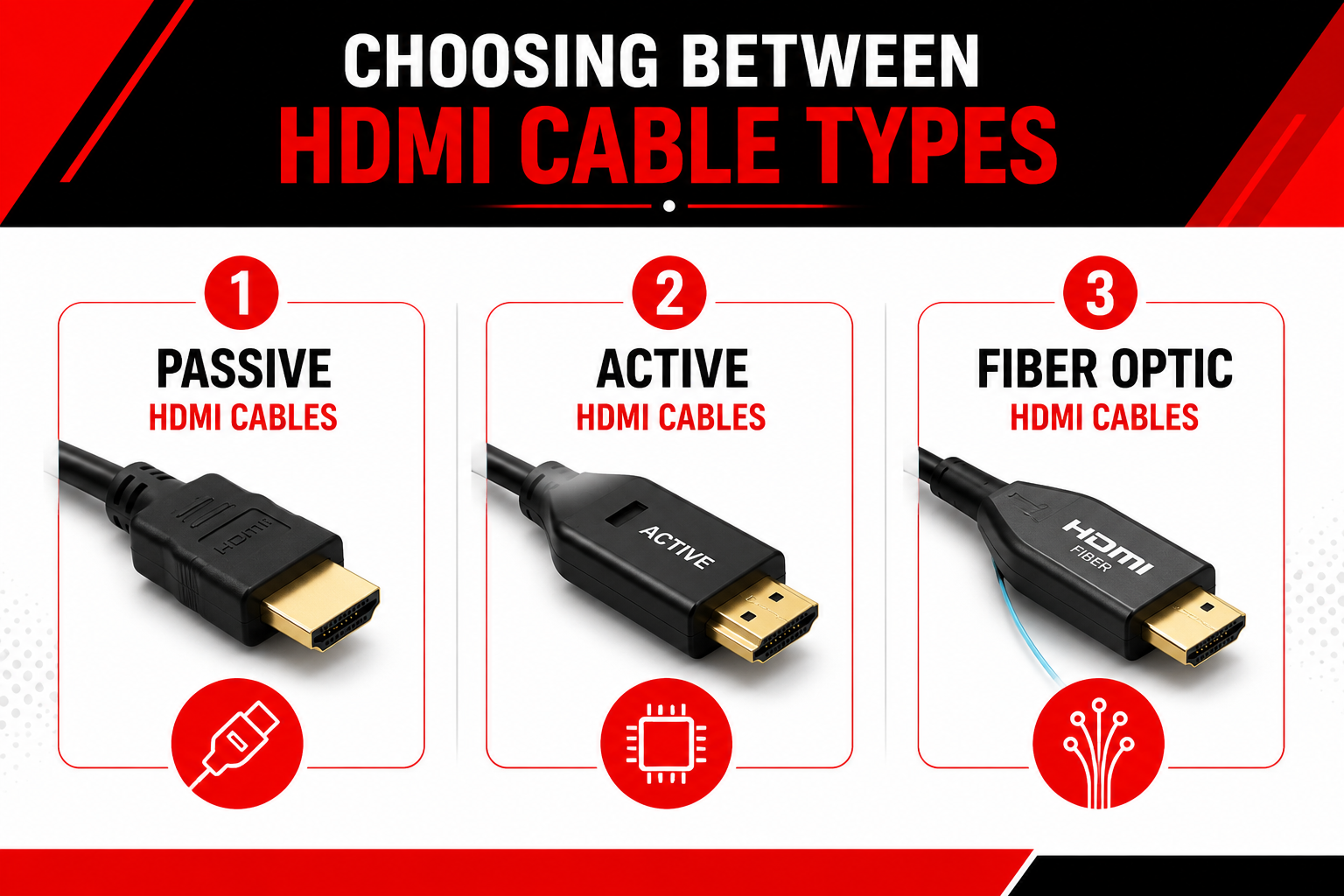
HDMI cables are generally available in three configurations: passive, active, and fiber optic. Each is designed to address different deployment requirements, making the right choice dependent on factors such as cable length, installation environment, and signal reliability rather than resolution alone.

1. Passive HDMI Cables

Passive HDMI cables use traditional copper conductors without built-in signal processing. Their straightforward design makes them the most common choice for shorter cable runs where connected devices are located relatively close together.

When paired with the appropriate HDMI cable certification, passive cables can support a wide range of commercial AV applications, including conference rooms, desktop workstations, equipment racks, and digital displays. They also tend to be the simplest to install because they do not require onboard electronics or directional connections.

2. Active HDMI Cables

Active HDMI cables contain integrated electronics that help maintain signal quality over longer cable runs. Because these cables process the signal internally, they are typically directional and must be installed according to the manufacturer's specified source and display ends.

They are often used in commercial AV environments where installation distances exceed the practical range of passive copper cables but do not warrant a fiber optic solution.

3. Fiber Optic HDMI Cables

Fiber optic HDMI cables transmit HDMI signals over optical fiber rather than copper conductors. By converting electrical signals into optical signals and back again, they support high-bandwidth transmission across much longer distances while remaining immune to electromagnetic interference (EMI).

These cables are commonly selected for large conference spaces, auditoriums, digital signage, control rooms, and other installations where maintaining signal integrity over extended cable runs is a priority. Organizations deploying longer optical links may also evaluate Active Optical Cables (AOCs) for high-bandwidth connectivity in enterprise and data center environments.

The appropriate cable type ultimately depends on the performance requirements of the entire AV system, including bandwidth, installation distance, and deployment environment.

HDMI Cable Type Best Suited For Primary Advantage
Passive HDMI Short-distance AV connections Simple installation with no onboard electronics
Active HDMI Medium-distance commercial AV installations Helps maintain signal quality over longer runs
Fiber Optic HDMI Long-distance, high-bandwidth AV infrastructure Supports extended distances while resisting electromagnetic interference

Read Next: Maximizing High-Speed Data Transmission and Data Center Connectivity with Active Optical Cable (AOC)

How Cable Length Affects 8K AV Performance

Cable length is one of the most important considerations when selecting an HDMI cable for 8K AV. As transmission distances increase, maintaining signal integrity becomes more challenging, particularly when supporting higher resolutions, refresh rates, Dynamic HDR, and other bandwidth-intensive HDMI features.

However, there is no universal maximum cable length that applies to every installation. Performance depends on several variables, including the cable's construction, certification, manufacturing quality, connected equipment, and installation conditions.

Instead of asking, "How far can an HDMI cable reach?", the more useful question is:
Can this cable reliably support the required bandwidth over the planned installation distance?

For shorter installations, a certified passive HDMI cable may provide reliable performance. As cable runs become longer, active HDMI or fiber optic HDMI cables may offer a more dependable solution by helping preserve signal quality across the required distance. In networked AV environments where signals need to transition between copper and fiber infrastructure, Media Converters can also play an important role in extending connectivity over longer distances.

Installation practices also influence long-term performance. Excessive bending, improper routing, cable strain, or poor cable management can affect reliability regardless of the cable type selected. Planning the cable pathway before installation helps reduce these risks and simplifies future maintenance.

Read More: How to Choose the Right Fiber Media Converter for Your Network

Find HDMI Cables Designed for Professional AV Applications


What to Look for When Selecting an HDMI Cable for 8K AV

Selecting an HDMI cable should involve more than matching a product label to a display resolution. A reliable installation begins by evaluating the technical requirements of the entire AV system and ensuring the cable can support both current performance needs and future expansion.

Before making a purchasing decision, consider the following questions:

  • What resolution and refresh rate will the system support?

  • Which HDMI features are required, such as Dynamic HDR, eARC, VRR, or ALLM?

  • How long will the cable run be?

  • Is the cable certified for the required performance level?

  • Will the cable be routed through walls, ceilings, conduit, or equipment racks?

  • Do all connected devices support the desired HDMI features?

Answering these questions before selecting a cable can help reduce compatibility issues, improve installation reliability, and ensure the AV system performs as intended over its operational life. The next step is understanding the most common mistakes made when selecting HDMI cables for 8K AV and how to avoid them.

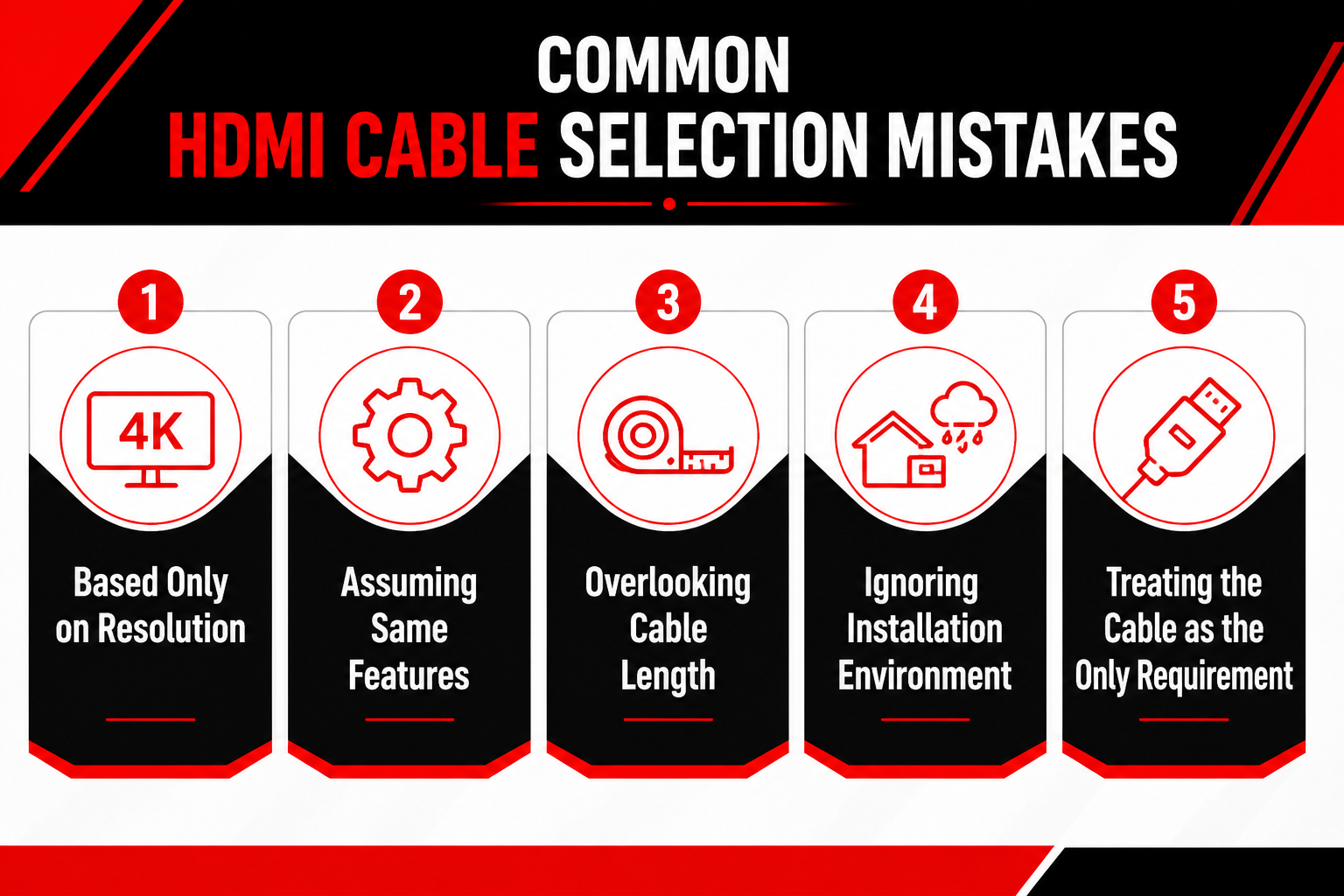
Common HDMI Cable Selection Mistakes

Understanding HDMI standards, cable types, and bandwidth requirements is only part of the selection process. Even well-planned AV deployments can experience compatibility or performance issues if key considerations are overlooked during specification or installation.

The following mistakes are among the most common and can often be avoided through careful planning:

  1. Choosing a Cable Based Only on Resolution: An "8K" label alone doesn't guarantee that a cable will support your application's requirements. Resolution is only one aspect of HDMI performance. Refresh rate, bandwidth, HDR support, audio features, cable certification, and installation distance should all be evaluated before selecting a cable.

  2. Assuming Every HDMI Cable Supports the Same Features: Features such as Dynamic HDR, Enhanced Audio Return Channel (eARC), Variable Refresh Rate (VRR), and Auto Low Latency Mode (ALLM) require compatible devices and a cable capable of supporting the necessary performance level. If any component in the signal path lacks support, those features may not function as intended.

  3. Overlooking Cable Length During Planning: Longer cable runs introduce additional challenges for maintaining signal integrity, particularly in high-bandwidth AV systems. Selecting the appropriate cable type early in the planning process can help reduce installation issues and improve long-term reliability.

  4. Ignoring the Installation Environment: The physical installation is just as important as the technical specifications. Cable routing, bend radius, conduit pathways, and sources of electromagnetic interference can all influence cable selection and long-term performance.

  5. Treating the Cable as the Only Requirement: An HDMI cable is only one part of the overall AV infrastructure. Displays, source devices, AV receivers, switches, extenders, and other connected equipment must all support the required HDMI features to achieve the desired performance.

Applying These Considerations to Your Next AV Deployment

Selecting an HDMI cable is ultimately about matching the cable's capabilities to your application's technical requirements. Once you've determined the required bandwidth, installation distance, cable type, and system compatibility, the next step is choosing products designed for those conditions.

TTI Cable offers a range of Audio & Video Cables that support commercial AV, enterprise infrastructure, education, digital signage, and other professional environments. Rather than relying on a single cable solution, selecting the appropriate product begins with understanding the deployment requirements and then choosing a cable that aligns with those needs.

Whether you're planning a new installation or upgrading an existing AV system, taking a requirements-first approach can help improve compatibility, simplify installation, and support reliable long-term performance.

Read Next: The Ultimate Guide to Structured Cabling Installation

Building a More Reliable 8K AV Infrastructure

Choosing the right HDMI cable for 8K AV involves more than selecting the highest resolution printed on the packaging. Reliable performance depends on understanding how bandwidth, cable certification, cable construction, installation distance, and system compatibility work together.

By evaluating these considerations before deployment, AV integrators, IT teams, and infrastructure professionals can reduce compatibility issues, simplify installation, and build systems that are better prepared for current and future performance requirements.

Key Takeaways

  • Match the HDMI cable to your application's bandwidth requirements, not just its advertised resolution.

  • Understand the difference between HDMI device versions and HDMI cable certifications.

  • Choose passive, active, or fiber optic HDMI cables based on installation distance and deployment conditions.

  • Verify that every device in the signal path supports the HDMI features your system requires.

  • Plan cable selection as part of the overall AV infrastructure rather than as an isolated component.

Read More: Fiber Optic Cable vs. Copper Cable: Key Differences

If you're evaluating HDMI solutions for a commercial AV deployment, explore TTI Cable's Audio & Video Cables to identify products that align with your application's performance and installation requirements.

Ready to Choose the Right HDMI Cable?


Frequently Asked Questions

How do I choose the right HDMI cable for 8K AV?

To choose the right HDMI cable, start by identifying your system's bandwidth requirements, installation distance, and required HDMI features. If your application supports 8K at 60Hz or 4K at 120Hz, you'll typically need an Ultra High Speed HDMI Cable. The right HDMI cable should also match the capabilities of your display, source devices, and other equipment in the signal path.

Is there such a thing as an HDMI 2.1 cable?

No. Although many people refer to an "HDMI 2.1 cable," HDMI versions apply to devices, not cables. HDMI cables are certified by performance category. For HDMI 2.1 features like Variable Refresh Rate (VRR), Enhanced Audio Return Channel (eARC), and 8K at 60Hz and 4K at 120Hz, an Ultra High Speed HDMI Cable is typically required.

What are the different types of HDMI cables?

The primary types of HDMI cables include Standard HDMI, High Speed HDMI, Premium High Speed HDMI, and Ultra High Speed HDMI Cables. In addition, HDMI cables are available in passive, active, and fiber optic designs to support different installation distances and deployment requirements. Selecting the best HDMI cable depends on your bandwidth requirements, the length of the cable, and the installation environment.

Does cable length affect 4K and 8K HDMI performance?

Yes. The length of the cable can affect signal integrity, especially in high-bandwidth 4K and 8K applications. Longer cable runs may require active HDMI, fiber optic HDMI, or an HDMI extender to maintain reliable audio and video performance. The appropriate solution depends on the installation distance, cable construction, and connected equipment.

What HDMI cable is best for gaming or a home theater?

Whether you're planning gaming setups or setting up a home theater, you'll need a cable that supports the features your equipment requires. Modern consoles, 4K TVs, and 8K TVs that support 4K at 120Hz, 8K gaming, or advanced HDMI 2.1 features generally require an Ultra High Speed HDMI Cable. Matching the cable to your display, AV receiver, and source devices helps deliver reliable audio and video performance.

How to Install Fiber Optic Cables for Reliable Network Performance

1 min read

How to Install Fiber Optic Cables for Reliable Network Performance

Installing fiber optic cables correctly starts long before the cable is pulled. Proper planning, careful handling, and thorough testing help protect...

Read More
Why Direct Attach Cables Are Gaining Popularity in Data Centers

1 min read

Why Direct Attach Cables Are Gaining Popularity in Data Centers

Direct Attach Cables (DACs) are gaining popularity in data centers because they provide a cost-effective, low-latency, and power-efficient way to...

Read More
Maximizing High-Speed Data Transmission and Data Center Connectivity with Active Optical Cable (AOC)

1 min read

Maximizing High-Speed Data Transmission and Data Center Connectivity with Active Optical Cable (AOC)

Organizations today rely on high-speed data transmission to keep up with increasing workloads, large data transfers, and real-time applications. From...

Read More