13 min read
How to Choose the Right Keystone Jack for Your Network
Bob joined Turn-key Technologies in 2011, and helped launch TTI Cable, which is the structured cabling division of TTI. Additionally, he created TTI Fiber which is our overseas affiliate for fiber optic cable manufacturing. With over 20 years of experience in both domestic and international trade and sales, Bob has dedicated himself to providing each and every client with the best solution for their networking needs. It has been under Bob’s supervision that he has created an equally experienced ...
Bob Gissubel
August 21, 2026
Choosing the right keystone jack starts with matching it to the cable category, required network speed, shielding strategy, and termination method of the installation. Cat5e, Cat6, Cat6A, shielded, and unshielded jacks may share the same modular form factor, but their performance and installation requirements can differ significantly.
The jack forms part of the permanent link between the horizontal cable and the network outlet, so its specifications and termination quality can affect insertion loss, crosstalk, signal integrity, and overall channel performance. Conductor size, shielding, patch panel compatibility, PoE requirements, and available termination space should all be considered before a jack is specified.
Higher-category copper is also taking a larger share of structured cabling deployments. A 2026 Panduit technical brief, citing BSRIA’s Structured Cabling 2025 (USA) Report, states that Category 6A accounts for 41% of U.S. copper cabling sales. This guide explains how to choose the right keystone jack based on performance requirements, cable compatibility, shielding, termination, PoE, and the conditions of the structured cabling installation.
💡 TL;DR: What to Check Before Choosing a Keystone Jack
-
Match the jack to the cable category. Keep Cat5e, Cat6, and Cat6A components aligned across the channel.
-
Choose shielding as a system. Shielded jacks should match the cable, patch panel, grounding approach, and installation environment.
-
Verify conductor compatibility. Check wire gauge, conductor type, and cable construction before termination.
-
Pick the right termination style. Punch-down and toolless jacks both work well when installed correctly.
-
Confirm physical fit. Check compatibility with the patch panel, wall plate, or surface-mount box.
-
Plan for PoE and network speed. Make sure the jack supports the application and expected performance requirements.
What is a Keystone Jack and Where Does It Fit in a Structured Cabling System?
A keystone jack is a modular female connector used to terminate network cable at a fixed connection point, typically in a wall plate, surface-mount box, or patch panel. The horizontal cable terminates at the rear of the jack, while the front accepts the patch cable that connects to the endpoint.
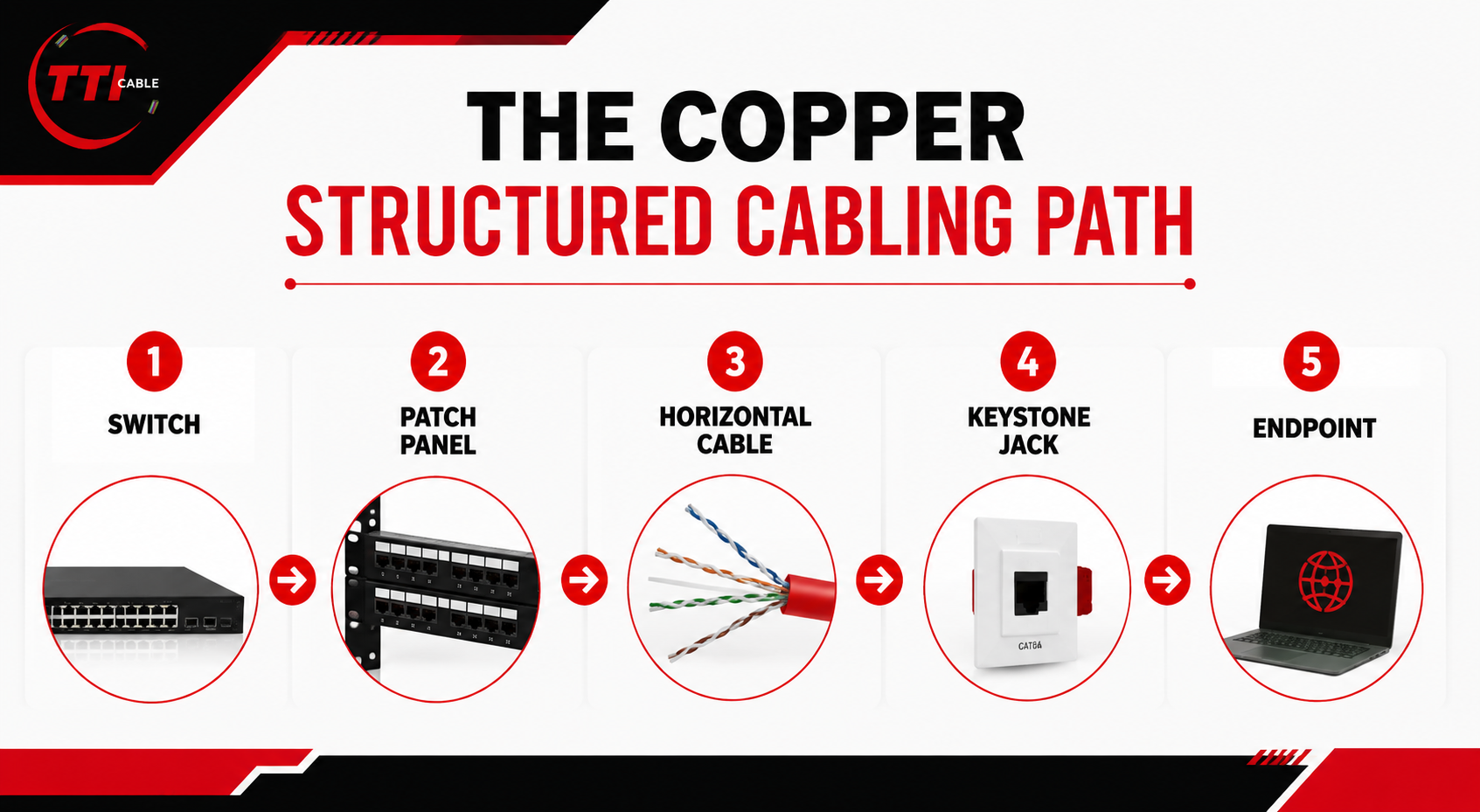
In a typical copper structured cabling system, the path looks like this:
Switch → Patch Panel → Horizontal Cable → Keystone Jack → Endpoint

That position matters because the jack becomes part of the permanent link and must work with the cable category, shielding strategy, conductor size, and other connecting hardware. A Cat6A jack on lower-category cabling does not make the full link Cat6A, and a shielded jack does not create a properly shielded system on its own.
Physical fit also does not guarantee compatibility with performance. Two keystone jacks may fit the same patch panel or wall plate while supporting different categories, conductor sizes, shielding types, or termination methods.
Read More: Don’t Let Bad Cabling Break Your Network: A Complete Guide to Structured Installation
How to Choose the Right Keystone Jack for Your Network
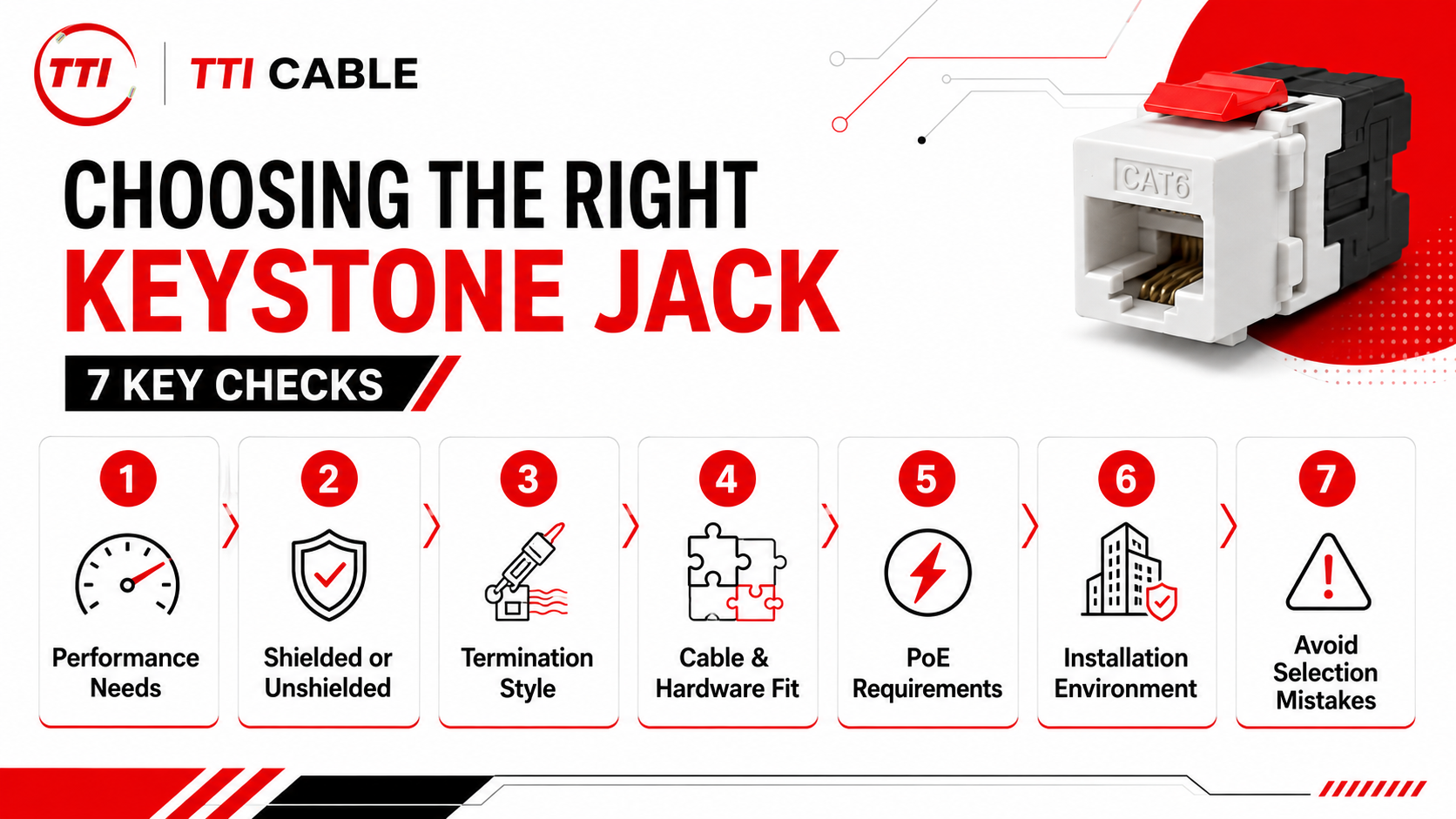
Choosing the right keystone jack comes down to a few practical checks: the performance level the network needs, the cable being terminated, whether shielding is required, the termination method, PoE use, and where the jack will be installed.
These factors should be evaluated together. A jack that fits a wall plate or patch panel may still be the wrong choice if its category rating, conductor compatibility, or shielding does not match the rest of the structured cabling system. The selection process is easier when handled in order. Start with network performance, then work through shielding, termination, hardware compatibility, PoE requirements, and the installation environment.

Step 1: Start With the Network Performance Requirement
Before selecting a keystone jack, define the speed and cable category the link needs to support. The jack is part of the permanent link, so its performance should align with the horizontal cable and other connecting hardware.
Match the Keystone Jack to the Cable Category
In most installations, the safest approach is to keep the jack aligned with the cable category. Cat6 cabling should use connecting hardware intended for Cat6 performance, while Cat6A installations should use components selected to maintain Cat6A performance across the link.
Installing a higher-category jack does not upgrade lower-category cable. A Cat6A keystone jack on Cat6 cable still limits the link to the lower-performing component and the quality of the installation.
That matters because category performance depends on the complete link, including parameters such as insertion loss, return loss, and crosstalk. TTI Cable’s The Ultimate Guide to Structured Cabling Installation similarly emphasizes matching cable types and components to the network’s performance requirements.
Consider Current and Planned Network Speeds
The network speed required today should be the starting point, but the expected service life of the cabling also matters.
Cat5e may still be appropriate for some existing lower-demand installations, while Cat6 is common for general enterprise connectivity. Cat6A becomes more relevant when the design calls for higher-speed copper links and longer-term support for 10 Gigabit Ethernet.
If switches, access points, workstations, or other endpoints are likely to migrate to higher data rates over the life of the cabling, this should be considered before the jacks are specified. Replacing a keystone jack is simple compared with replacing horizontal cable throughout a building, so the category decision should reflect the planned network rather than only the equipment installed on day one.
Read More: Fiber Optic Cable vs Copper Cable: Which One Will Power the Future of Your Network?
Step 2: Decide Between Shielded and Unshielded Keystone Jacks
After category and speed, determine whether the cabling system needs shielding. The decision should be based on the cable construction, surrounding electrical environment, and how the full link is designed.
| Requirement | Unshielded Keystone Jack | Shielded Keystone Jack |
|---|---|---|
| Typical Cable Type | UTP | Shielded twisted-pair cable |
| Common Environments | Offices, schools, commercial spaces | Industrial areas, equipment rooms, electrically noisy spaces |
| EMI/RFI Exposure | Low to moderate | Higher exposure |
| Installation Complexity | Lower | Higher |
| Bonding Considerations | Generally not required for the jack | Must be planned as part of the shielded system |
| Best Fit | Standard enterprise and commercial cabling | Networks exposed to significant electrical interference |
When Unshielded Jacks Make Sense
An unshielded keystone jack is usually appropriate for UTP installations in offices, schools, and other controlled environments where electromagnetic interference is limited. These systems are simpler to install because they do not require shield continuity or additional bonding considerations.
When Shielded Jacks Should Be Considered
A shielded keystone jack is more appropriate where cable runs are exposed to motors, power equipment, machinery, or other sources of electromagnetic interference. The jack should match the shielding construction of the cable and the rest of the connecting hardware.
Shielding Must Be Evaluated as a System
A shielded jack by itself does not create a shielded cabling system. The cable, keystone jack, patch panel, connecting hardware, and bonding approach need to work together. For installers, the practical rule is simple:
Choose shielding at the system level, not component by component.
Step 3: Choose the Right Termination Style
Once category and shielding are defined, consider how the jack will be terminated in the field. The two common approaches are punch-down and tool-less termination. Both are available in category-rated keystone designs, so the choice usually comes down to installation workflow, technician preference, available working space, and project scale.
| Termination Style | How It Works | Best Fit |
|---|---|---|
| Punch-Down | Individual conductors are seated into IDC contacts with a compatible termination tool | Large installations, technicians accustomed to 110-style termination |
| Tool-Less | Conductors are positioned and seated using the jack’s built-in termination mechanism | Tight work areas, smaller projects, or installations where fewer termination tools are preferred |
Punch-Down Keystone Jacks
Punch-down jacks use insulation displacement contacts, or IDCs, to terminate each conductor. A compatible punch-down tool seats the conductor and, depending on the jack design, may also trim excess wire. Because supported conductor gauge and cable construction can vary by product, always verify compatibility against the specific jack datasheet before termination.
For contractors terminating a large number of outlets, punch-down jacks offer a familiar and repeatable workflow. Consistent conductor placement, limited pair untwist, proper seating, and final link testing are all important for maintaining the intended cabling performance.
Tool-Less Keystone Jacks
Tool-less keystone jacks use an integrated closure or termination mechanism to seat the conductors without a conventional punch-down tool. Current Cat6 and Cat6A tool-free designs are available for both unshielded and shielded applications.
They can be useful where working space is limited or where installers want to reduce dependence on a separate termination tool. “Tool-less,” however, does not mean preparation can be skipped. Cable jacket removal, pair placement, conductor routing, and the manufacturer’s termination sequence still need to be followed carefully.
Which Termination Style Should You Choose?
Neither style is automatically better for network performance. Choose a jack that is rated for the required cable category and conductor range, then select the termination method that fits the installation. For high-volume projects with technicians already equipped for 110-style termination, punch-down jacks are often practical. For smaller deployments, constrained spaces, or field work where tool access is inconvenient, a tool-less jack may simplify the process.
In either case, termination consistency matters more than the mechanism itself. Poor conductor placement, excessive untwisting, or using the wrong cable construction can compromise the finished link regardless of which type of keystone jack is installed.
Step 4: Check Cable and Hardware Compatibility
Once performance, shielding, and termination style are set, verify that the jack actually fits the cable and mounting hardware being used. This is where small specification differences can create installation problems, especially when components are sourced from different product families.
Cable Construction and Conductor Compatibility
Do not assume every keystone jack accepts every Ethernet cable within the same category. Before ordering, check:
-
Supported Conductor Gauge
-
Solid Versus Stranded Conductors
-
Cable Category
-
Shielded Versus Unshielded Construction
-
Maximum Conductor Insulation Diameter, When Specified
Supported conductor ranges vary by keystone jack. Some jacks accommodate a wider range of solid or stranded conductors than others, even within the same cable category. Always verify the supported wire gauge, conductor type, and insulation diameter against the specific jack datasheet before installation.
That variation is why the jack datasheet should be checked against the actual cable rather than relying on category rating alone.
Patch Panel and Wall Plate Compatibility
The next check is mechanical fit. Keystone jacks are modular, but body depth, width, termination orientation, and clearance can vary.
A 90° jack, for example, routes the cable away from the termination point differently than a 180° jack. That can matter behind shallow wall plates, inside surface-mount boxes, or in densely populated patch panels where bend radius and technician access are limited.
TTI Cable’s current Keystone Jacks use a 90-degree punch-down design and a snap-in modular format intended for compatible keystone wall plates and patch panels. For rack-side planning, TTI Cable’s Copper Patch Panels are also relevant when checking how the jack, panel, and cable management approach fit together.
Do Not Assume Every Keystone Component Is Interchangeable
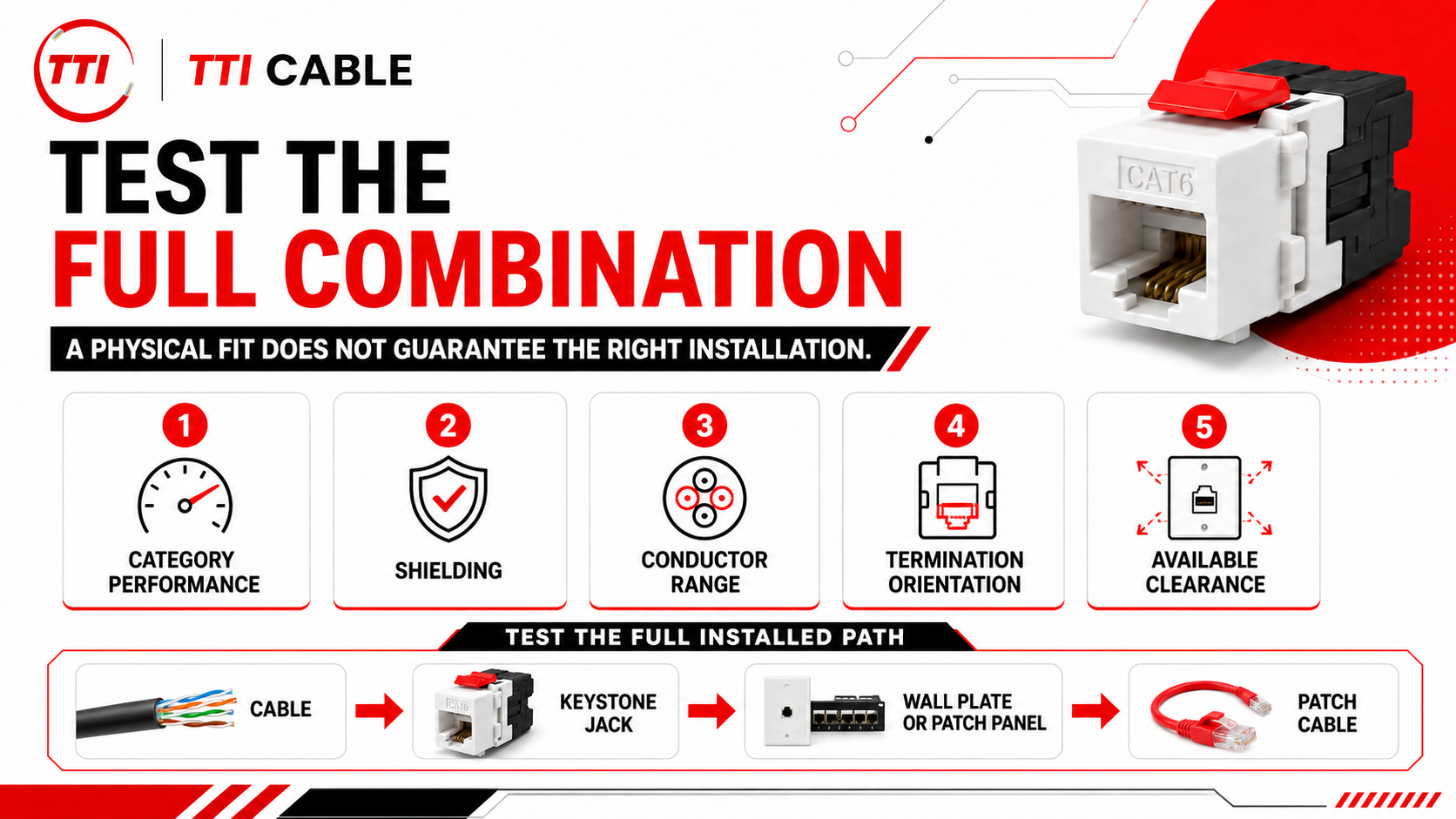
A jack can physically snap into an opening and still be wrong for the installation. Category performance, shielding, conductor range, termination orientation, and available clearance all need to line up. Before standardizing a jack across a project, test the full combination that will actually be installed:
Cable → Keystone Jack → Wall Plate or Patch Panel → Patch Cable

That simple compatibility check can prevent retermination work, crowded panels, damaged conductors, and components that fit mechanically but do not match the intended cabling design.
Read More: Custom Cabling Checklist: 10 Questions to Answer Before Manufacturing Begins
Step 5: Account for Power over Ethernet Requirements
If the connection will carry Power over Ethernet, include that requirement before standardizing on a keystone jack. PoE allows copper Ethernet cabling to carry data and power to devices such as wireless access points, IP cameras, VoIP phones, and IoT endpoints.
This becomes more important with higher-power PoE applications. IEEE 802.3bt expanded PoE to use all four pairs of the structured cabling link, which means the keystone jack and its terminations sit directly in the powered connection path. Before approving a jack for a PoE installation, verify:
-
the intended PoE application and power requirements
-
cable category and conductor compatibility
-
shielded or unshielded system design
-
the jack manufacturer’s stated PoE suitability
-
correct termination according to the product specifications
Treat PoE compatibility as its own specification check rather than assuming that a Cat6 or Cat6A rating automatically answers the power question. For TTI Cable products, confirm the required PoE capability against the applicable Copper Keystone Jack specifications before deployment.
For more context on where PoE influences copper cabling decisions, see TTI Cable’s Fiber Optic Cable vs Copper Cable: Key Differences.
Step 6: Match the Keystone Jack to the Installation Environment
The same keystone jack specification will not make sense for every deployment. Port density, electromagnetic interference, PoE use, mounting space, cable routing, and maintenance access can change considerably between an office network, data center, utility facility, and multi-site deployment.
These differences are especially relevant across the environments served by TTI Cable, including enterprise networks, AI data centers, government and defense projects, internet service providers, utilities and energy infrastructure, and multi-site organizations.
1. Enterprise and Multi-Site Networks
Enterprise Network Infrastructure often involves large numbers of workstations, wireless, security, and communications connections spread across offices, campuses, data rooms, and IDF/MDF locations.
For these environments, standardizing the keystone jack category, termination method, and mounting format across similar areas can simplify installation, spare inventory, moves, adds, and troubleshooting.
Similar considerations apply to Hospitality and Multi-Site Enterprises, where the same network design may need to be repeated across hotels, restaurants, retail locations, branches, or other distributed facilities. Consistency becomes particularly valuable when installation and maintenance are handled across many sites.
2. AI Data Centers and High-Density Network Spaces
AI Data Centers place greater emphasis on connection density, cable management, and serviceability. Where keystone jacks are installed in modular copper patch panels, technicians need enough clearance for termination, cable routing, and future access. Jack depth and 90° versus 180° termination orientation can therefore matter in crowded racks or telecommunications spaces.
TTI Cable’s Copper Keystone Jacks and Copper Patch Panels should be evaluated together when planning this portion of the copper connection.
3. Government and Defense Projects
Government and Defense Contractors may be supporting offices, secure facilities, labs, data rooms, or operations centers. Keystone jack selection in these environments still starts with the same fundamentals: cable category, shielding, conductor compatibility, PoE requirements, and mounting hardware. Where separate network zones have different requirements, one jack specification should not automatically be applied throughout the facility.
4. Internet Service Provider Networks
For Internet Service Providers, copper connections may appear alongside fiber infrastructure in equipment rooms, customer-facing network locations, MDUs, and other access-network environments.
The practical concern is compatibility with the specific copper portion of the deployment. Installers should verify cable category, termination method, panel fit, and available working space rather than selecting a keystone jack simply because it uses the expected modular format.
5. Utilities and Energy Environments
Utilities and Energy can introduce more demanding electrical conditions, particularly around substations, control rooms, power systems, and other operational equipment. Where electromagnetic interference is a concern, the decision between shielded and unshielded cabling deserves additional attention. If shielding is required, the cable, keystone jack, patching hardware, and bonding approach should be planned as one system.
The practical approach is to standardize where installation requirements are genuinely similar, then create separate jack specifications when the environment changes. The jack used across an enterprise office floor may not be the appropriate choice for a high-density data center rack, utility control room, or other electrically demanding space.
Step 7: Avoid Common Keystone Jack Selection Mistakes
Most keystone jack problems start before termination. A component gets specified because one detail, such as category or physical fit, is checked while the rest of the connection is overlooked. Matching components to performance requirements, following proper termination practices, and testing completed runs can prevent many of these issues. Common mistakes to watch for include:
-
Choosing by category label alone. A Cat6A jack does not upgrade lower-category cable or other components in the link. Match the jack, horizontal cable, patching hardware, and intended network performance.
-
Assuming physical fit means full compatibility. A jack may snap into a wall plate or patch panel and still have the wrong conductor range, shielding type, or termination orientation. Check both mechanical fit and electrical requirements.
-
Ignoring conductor compatibility. Wire gauge, solid or stranded construction, and conductor insulation dimensions can vary between cable and jack designs. Verify the actual cable against the jack specifications before ordering.
-
Adding a shielded jack to an otherwise unshielded design. Shielding should be planned across the cable, jack, patch panel, and bonding approach. Treat it as a system decision rather than a single-component upgrade.
-
Overlooking PoE requirements. If the link will power wireless access points, cameras, phones, or other devices, confirm that the selected jack is appropriate for the intended PoE application instead of relying on category rating alone.
-
Ignoring jack depth and termination orientation. A jack that works on paper can still be awkward to install behind a shallow wall plate or inside a crowded patch panel. Check available clearance, cable routing, bend space, and whether a 90° or 180° orientation better suits the enclosure.
-
Skipping final testing and documentation. A termination can look correct and still fail to meet the intended link performance. Test completed runs and keep records that make future troubleshooting and changes easier.
Read More: The Cable Manufacturing Process Lifecycle: How Quality Is Built
Keystone Jack Comparison Framework
By this point, the selection should be narrowed down to a few practical requirements rather than a long list of jack types. The table below can be used as a final specification check before a keystone jack is standardized across the project.
| Deployment Requirement | What to Look For | Selection Direction |
|---|---|---|
| Cable Category | Jack category matches the installed horizontal cable and the intended link performance | Keep Cat5e, Cat6, or Cat6A components aligned with the cabling design |
| Low-EMI Commercial Environment | Compatibility with UTP cable and required category | An unshielded keystone jack may be appropriate |
| Higher EMI Exposure | Shield compatibility across cable, jack, panel, and bonding approach | Evaluate a shielded cabling system rather than adding shielding at one component |
| High-Volume Field Termination | Familiar workflow, compatible termination tool, repeatability | Punch-down may suit installation teams already using 110-style termination |
| Restricted Working Space | Jack depth, cable-entry direction, termination access | Consider the termination style and jack orientation that fit the available space |
| PoE-Connected Devices | Suitability for the intended powered application and cable construction | Verify PoE requirements before approving the jack |
| Modular Patch Panel Installation | Keystone opening, jack dimensions, rear clearance, cable routing | Check the actual jack and panel combination before ordering at scale |
| Large or Multi-Site Rollout | Common category, termination method, mounting format, and documented part specification | Standardize where network and environmental requirements are consistent |
The selection becomes much easier when these requirements are considered together. A typical enterprise office may call for an unshielded Cat6 or Cat6A jack with a familiar termination method, while an electrically noisy facility could require a different shielding strategy. A crowded telecommunications room may make physical clearance and termination orientation just as important as the category printed on the jack.
The cable, terminations, patch panels, outlets, and telecommunications spaces should be evaluated as parts of the same infrastructure. Compatibility across those components is what helps the finished cabling system meet its intended performance and installation requirements.
For projects built around modular copper connectivity, TTI Cable's Copper Keystone Jacks, Copper Patch Panels, and Copper Patch Cords can be reviewed together when defining the connection path. These are verified product pages in TTI Cable’s supplied site inventory.
The objective is to arrive at a documented jack specification that installers can repeat consistently, while allowing different specifications where cable category, shielding, PoE, or installation conditions genuinely change.
Read Next: How to Future-Proof Your Network Cabling Infrastructure
Standardize the Right Jack for the Right Environment
Choosing the right keystone jack comes down to how well it matches the actual installation. Cable category, shielding, conductor compatibility, PoE requirements, termination method, and mounting hardware should all be confirmed before a jack is standardized across a project.
For larger deployments, it may make sense to define different approved jack specifications for office areas, high-density telecommunications rooms, industrial spaces, or PoE-heavy network zones where installation conditions differ. If you are evaluating components for a new installation or standardizing an existing network, explore TTI Cable’s Copper Keystone Jacks or Contact TTI Cable to discuss your project requirements.
Read Next: How to Choose The Right Fiber Media Converter for Your Network: A Strategic Guide
Frequently Asked Questions
What is the difference between an RJ45 connector and a keystone jack?
An RJ45 connector is typically the modular plug attached to the end of an Ethernet patch cable, while a keystone jack is the female network jack installed in a wall plate, surface-mount box, or patch panel. In a standard setup, the RJ45 plug inserts into the RJ45 port on the front of the keystone jack. When comparing RJ45 vs. keystone, they usually serve different roles within the same network connection.
Should I use a Cat5e, Cat6, Cat6A, or Cat8 keystone jack?
Choose a jack that matches the cable category and the performance level required by the link. A Cat5e jack is appropriate for Cat5e cabling, while a Cat6 jack or Cat6 keystone should be used where Cat6 performance is required. Cat6A should be paired with a Cat6A cabling design. Cat8 should only be considered for installations intentionally designed around Category 8 components. Using a higher-category jack alone will not increase the performance of lower-category cable.
Should I choose a 90° or 180° keystone jack?
The choice between a 90° or 180° keystone jack mainly depends on cable entry, available depth, and technician access. A 90° design can be useful where the cable needs to route away from the termination point, while a 180° jack may work better with direct rear cable entry. Check the wall plate, surface-mount box, or patch panel layout before deciding.
What are the benefits of keystone jacks compared with field termination plugs?
One of the main benefits of keystone jacks is their modular design. Individual network jacks can be installed or replaced within compatible wall plates and patch panels, which can simplify changes and maintenance. A field termination plug terminates the cable directly with a male connector instead. Keystone jacks are generally better suited to structured cabling locations where a fixed outlet or patching point is required.
Does the quality of the keystone jack affect network reliability?
Yes. The quality of the keystone jack, cable compatibility, and termination workmanship can all influence network reliability and link performance. A properly selected jack should match the cable category, conductor range, shielding strategy, and mounting hardware. Even a high-quality keystone can underperform if the cable is poorly prepared, improperly terminated, or mismatched with the rest of the cabling system.